The little AI in your notch that asks before it acts.

Yumi does small things for you (reminders, calendar events, notes and more), shows you exactly what will change, waits for your click, then checks it really happened.

Download the free alpha See it work

macOS 15+ · open source · version 0.1.0-alpha · Français

You ask, he does it

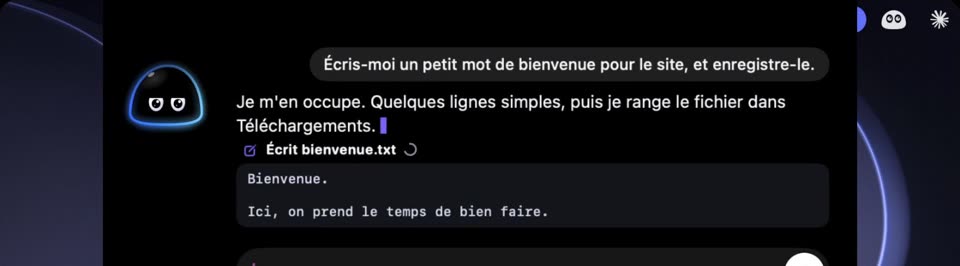
The chat in the notch: asked for a short welcome note, Yumi writes bienvenue.txt in Downloads, showing its content.

Real changes, in your real apps.

Ask in plain words. Yumi turns it into a plan, shows you exactly what will change (the file and its content, the reminder, the event) and waits for your click. Then he looks again: if it is not really there, he tells you.

Small actions. Real results.

He does not control your whole Mac. He never deletes, moves, sends a message, runs a command or edits a file he did not create. New tricks come with each release.

You stay in control

Lives in your notch

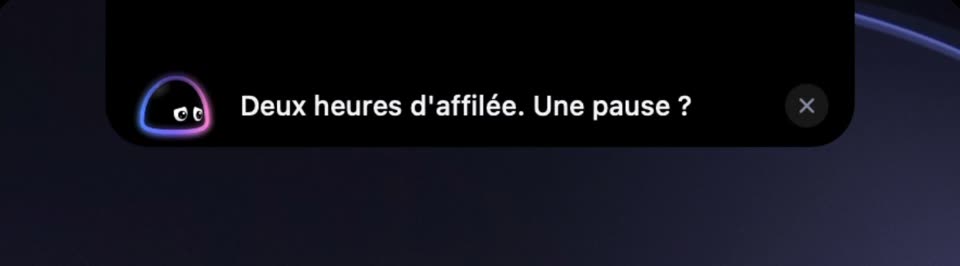
The folded island: Yumi suggests a break after two hours in a row.

Not another chat window.

He sits at the top of your screen and shows what matters now: your next meeting, today's reminders, your music. Sometimes he speaks first: a meeting coming, two hours without a break. What you tell him stays in a text file on your Mac that you can read and erase.

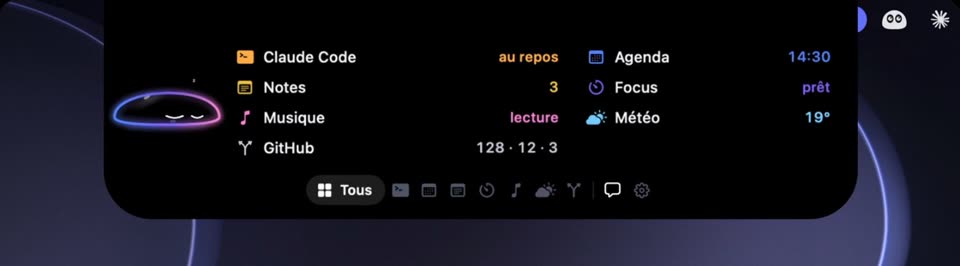
The island overview: Claude Code, Notes, Music, GitHub, Calendar, Focus and Weather, each with its key number.

Your day, one thing at a time.

Calendar, reminders, focus, music, weather, GitHub, Notion. You choose the modules and their order.

For developers

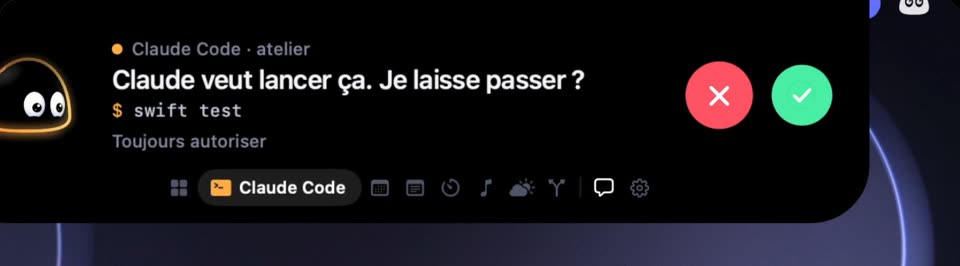
The open notch island: Claude Code asks to run swift test, with a red button to deny and a green one to allow.

Claude Code, in your notch.

Every session, in every terminal and editor, shows what it is working on. When Claude Code asks for a permission, the island opens and you answer from there, without switching windows.

Meet Yumi

An animated tour of what he does and how to install him (in French, with subtitles).

Install the alpha

  1. Download the zip.

    On the release page, take Yumi-0.1.0-alpha.zip.

    Release page
  2. Drag Yumi into Applications.

    Open the zip, then drag the app into your Applications folder.

  3. Open it anyway.

    This alpha is not notarized by Apple yet, so macOS blocks it the first time. Go to System Settings › Privacy & Security and click « Open Anyway ». Only once.

  4. He shows up in the notch.

    Right-click him for the settings. If you use Claude Code, he offers to follow your sessions: optional, and he shows you the change before writing it.

You need

  • macOS 15 or later. A Mac with a notch is recommended.
  • An AI engine for the chat and the actions: Claude Code, an Anthropic, OpenAI or Gemini key, or Ollama running on your Mac (free, nothing leaves your Mac).

Questions

Is it free?

Yes. Yumi is free and open source. The chat goes through the AI engine you choose: your Claude Code plan, your own API key, or Ollama for free on your Mac.

Can he do anything on my Mac?

No, and on purpose. He does a short list of small actions (reminders, events, text files, Notion tasks, focus), always shown before and checked after. New ones come with each release. Suggest the next one.

What about my data?

It stays on your Mac. No account, no telemetry. His memory is a plain text file you can read, fix or erase from his settings. Only the services you turn on are contacted.

Why does macOS block the first launch?

Because this alpha is not notarized by Apple yet. You allow it once in System Settings › Privacy & Security, with « Open Anyway ». Every release is built by GitHub from the public code, and you can verify it.

Does it work on a Mac without a notch?

Not tested yet. Yumi is made for the notch; Macs without one will come later.

What languages does he speak?

English and French, following your Mac's language.

How do I give feedback?

In Yumi's menu, « Send feedback » opens a form already filled in with your Yumi and macOS versions, no account needed. You can also open an issue on GitHub.